


Parcels: Track Online Orders
3.4602.00 Reviews
App Specs
- Version
- 3.0.10
- Updated On
- License
- Free
- Downloads
- 1,000,000+
- Developer
- ParcelsApp
- Categories
- Shopping
- Platform
- Android, iOS
Screenshots
 Analysis by AppCompare
If you’re anything like me, keeping track of all those online orders can sometimes feel like a juggling act. Enter Parcels: Track Online Orders, an app that brings shipments from different shops and couriers into one place. I found its appeal is immediate: instead of hunting through order emails whenever I want to check a delivery, I can start with a single tracking list. The more important question, though, is whether that small convenience is useful enough to keep the app around once the novelty wears off.
First Impressions
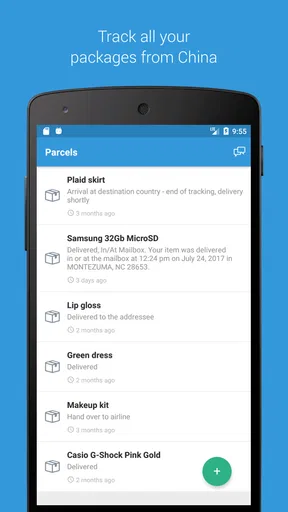
The first thing that struck me about Parcels was its clean and user-friendly interface. It’s like the app just gets me—simple and straightforward, without any unnecessary fluff. The moment you open the app, you’re greeted with a search bar and a list of your current shipments. It’s refreshingly intuitive, making it super easy to dive right in.
That quick start matters most when a parcel is already on the way and I just want to know whether it has moved. Parcels is a free shopping app from ParcelsApp, with a 3.4 average from around 23,000 ratings and more than a million installs. Those figures suggest it has found a real audience, though the mixed rating is a useful reminder that tracking apps depend on information from delivery services, so the experience can vary from shipment to shipment.
Setting Up Your Shipments
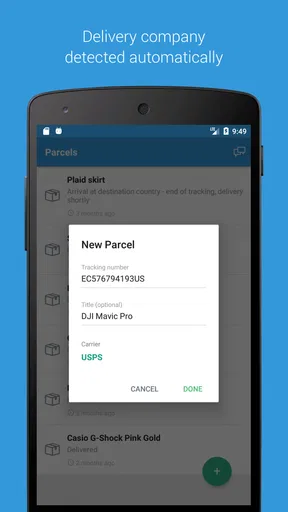
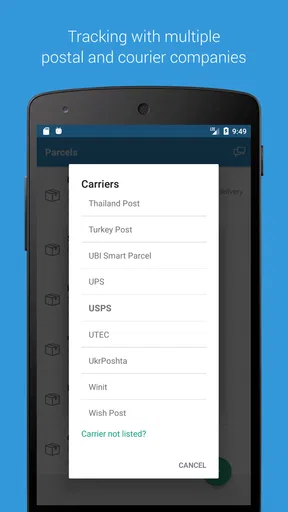
Adding a new package to track is a breeze. You just tap the ‘+’ icon, enter your tracking number, and bam—you’re all set. The app supports a dizzying array of couriers, from big names like FedEx and UPS to regional services you may not have heard of. It’s like a one-stop shop for tracking, which is a godsend when you’re shopping from different sites.
That’s especially useful if I buy several things in one week from different marketplaces. A parcel from eBay, another from Temu, and a delivery handled by UPS can all become separate entries in the same tracking routine, rather than three browser tabs and a search through my inbox. The app’s store summary also calls out Shein and Shopee, making its cross-shopping purpose clear. Still, a tracking number is the essential starting point: if a seller hasn’t issued one yet, there is nothing for a tracking app to follow.
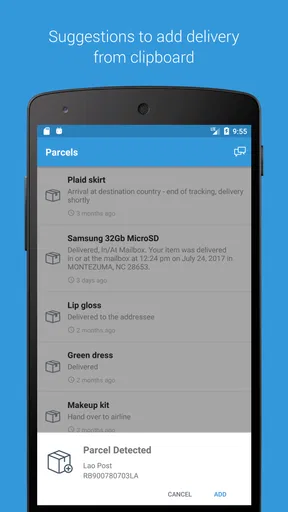
One of my favorite features is the auto-detect function. You know those times when you copy a tracking number and then have to figure out which courier it belongs to? Not here. Parcels does the legwork for you, automatically identifying the courier and saving you the hassle.
In everyday use, I’d treat auto-detection as a shortcut rather than a reason to skip checking the shipment details. If the app identifies a carrier incorrectly, or a parcel changes hands between delivery services, confirming that the tracking entry looks plausible can save time later. When a code is rejected or shows no progress, I’d first compare it with the seller’s order page and make sure the parcel has actually been handed to the carrier. A quiet tracking screen can mean a delay in carrier updates, not necessarily a lost package.
Worth Reading Before You Choose

Flipboard Shows What News Apps Must Do Beyond the Feed

Switching to Android Auto Means Rethinking Your Driving Routine

Google Calendar Makes a Crowded Week Easier to Manage

Ludo King Makes the Most of the Minutes Between Plans

Baby Panda World Brings Quick Play to Modern Phones, but Its Game Library Feels Busy

ESPN’s Live Game View Makes Following Close Games Easier
Real-Time Updates
The real magic happens with the real-time updates. I’m talking about status-change notifications. Parcels sends you push notifications whenever there’s a status change, so you’re always in the loop. No more refreshing the page like a maniac!
For a practical routine, I’d use those alerts to decide when to check in, not as a guarantee that every change will appear the instant it happens. Carrier tracking systems can publish scans at different points in a journey, and a third-party app can only show the information that becomes available to it. If an arrival is time-sensitive, checking the carrier’s own tracking page is still the sensible final step; for ordinary deliveries, keeping the parcel in one list is much less work.
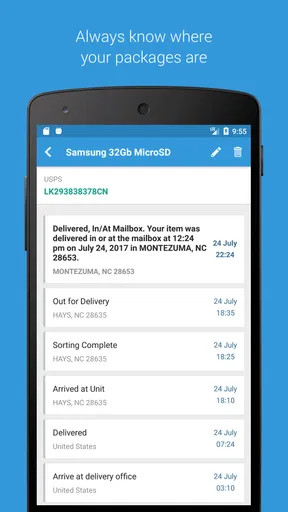
Moreover, the app provides a detailed history of your package’s journey. It’s oddly satisfying to see exactly where your parcel has been and when it’s due to arrive. I found myself checking the app just to watch my package move across the map. It’s like tracking Santa on Christmas Eve, but with more frequent updates.
A more useful way to read that history is as a sequence of recorded scans, rather than a promise about the next one. If a parcel seems stuck, the last event helps me distinguish “no new scan yet” from a shipment that has reached a particular stage. That can reduce needless checking, but it cannot resolve a delivery dispute or replace contacting the seller or courier when a package is genuinely overdue.
Customization and Features
Another neat aspect is the customization options. You can rename your shipments for easy identification—so instead of a string of numbers, you have ‘Mom’s Birthday Gift’ or ‘New Sneakers’. It makes the whole experience feel more personal.
Renaming is more than cosmetic once several boxes are moving at once. I’d use short labels that identify the order without putting private details in the name, especially if shipment information might be visible while I’m checking my phone around other people. A practical naming habit—shop or item plus a simple reminder—also makes it easier to spot which delivery needs attention without opening every tracking entry.
The app also lets you sync across devices. I tested it on both my phone and tablet, and the transition was seamless. It’s perfect for those of us who switch devices throughout the day.
This can make sense if I start checking deliveries on a tablet at home and later want to glance at the same list on my phone. It is less compelling if I only ever track an occasional order on one device; in that case, the seller’s order page or a courier’s own app may already be enough. Parcels earns its place most clearly when the same person is dealing with multiple stores and delivery companies, rather than when there is only one shipment to monitor.
Month-to-Month Value
The first week is likely to be the most satisfying: add current orders, give them recognizable names, and see scattered tracking details gathered together. After that, the app’s value depends on whether online deliveries are a regular part of your life. If I order every so often, it can still be useful during a busy stretch, but I may not need to open it between shipments. For frequent shoppers, the benefit is less about watching a package move and more about avoiding the repeated chore of finding the right order page.
Picture a weekday when I’m expecting a household item from one shop and a gift from another. I can check the list once before leaving home, see whether either shipment has a new status, and decide whether I need to make arrangements for delivery. That is a modest but tangible convenience. It does not make a carrier arrive sooner, and it cannot guarantee that a notification will arrive at the ideal moment; it simply gives me a shared place to check the information that is available.
Parcels was released in 2017 and its current version is 3.0.10. It is listed for Everyone and requires Android 8.0 or later on Android devices. The app is free to download, with optional in-app purchases ranging from $0.99 to $5.99 per item. I’d start with the free experience and decide based on actual routine: if I regularly hit a limitation that gets in the way, then I can judge whether paying is worthwhile. A casual shopper shouldn’t assume a paid option is necessary just to get value from keeping an eye on a few orders.
Where It Fits—and Where It Doesn’t
Compared with tracking each parcel on a retailer’s website, the main advantage here is consolidation: I don’t need to remember which shop or carrier has the relevant status. Compared with a courier’s own app, Parcels is more appealing when my deliveries come from several services, while the carrier’s app or website is the better place to turn when I need the most direct information from that particular company. These approaches can work alongside each other. I’d use Parcels for the overview and go to the seller or carrier when an order needs action.
It is a particularly good fit for people who shop across several marketplaces, receive frequent parcels, or share the mental load of keeping track of household orders. Someone who buys rarely, dislikes maintaining another app, or only wants the definitive details for one courier may be happier with the retailer’s existing order tracking. The key trade-off is simple: one consolidated list is handy, but it is another list that benefits from being kept tidy.
To keep that list useful, I’d remove or stop checking shipments once they are no longer relevant, rather than letting old deliveries compete with current ones. I’d also avoid treating the displayed arrival estimate as a firm appointment. Tracking is best for understanding progress and spotting a change in status; if I need to change delivery arrangements, report a missing parcel, or confirm a precise delivery window, the responsible seller or carrier remains the right contact.
Room for Improvement
While Parcels ticks a lot of boxes, there’s always room for improvement. I noticed that sometimes the app takes a little longer to update than expected. It’s not a deal-breaker, but it can be a tad frustrating when you’re eagerly waiting for that ‘Out for Delivery’ notification.
That delay is the biggest reason I wouldn’t use a tracker as my only source for urgent deliveries. If a package matters that day, I’d compare its status with the carrier’s own page instead of repeatedly reopening the app and expecting a fresh scan. For normal orders, a lag is easier to live with because the point is to reduce routine checking, not to provide a live view of every movement.
Also, while the app is free, there are some features locked behind a premium subscription. If you’re a heavy online shopper, it might be worth it, but casual users might find the free version more than sufficient.
The paid options should be weighed against a real inconvenience rather than the vague idea that a paid tier must be better. If the free setup already lets me keep tabs on the orders I care about, there is little reason to spend. If I repeatedly run into a restriction that disrupts my own tracking habits, I can consider whether an in-app purchase is justified. That makes the decision personal: the right value depends on how often I use the app and which parts of the experience I actually rely on.
Keeping the Habit Light
The maintenance burden is fairly straightforward: add a tracking number when it becomes available, give it a name I’ll recognize, and check the list when I have a reason. If I turn every scan into an invitation to open the app, the notifications and status changes can become noise rather than help. I’d leave the app to do the collecting and check it at practical moments—before heading out, when coordinating a delivery, or when I’m already reviewing an order.
That approach also makes the app easier to judge after the initial excitement fades. If it saves me from searching through several store accounts every week, it has a recurring job. If I find I only open it to watch one parcel and then forget it, that is a sign that the retailer’s tracking page may suit me better. The useful question is not whether every feature is interesting, but whether the central list removes a task I regularly dislike.
Final Thoughts
Overall, Parcels: Track Online Orders is a solid choice for anyone looking to streamline their package tracking. It’s intuitive, informative, and just plain fun to use. Whether you’re a seasoned online shopper or just getting into the game, this app is a handy tool to have in your arsenal.
Honestly, it’s taken a load off my shoulders, and I suspect it’ll do the same for you. So, go ahead and give it a try—I’d love to hear if it makes your online shopping experience a little less chaotic.
My lasting recommendation is measured rather than universal: I’d keep it installed if I had several active orders from different shops and wanted one place to scan their progress. I would skip it if my deliveries were occasional or one carrier already handled everything neatly. The app’s strongest habit is a quick overview, not constant monitoring, and treating it that way is what makes its convenience feel worthwhile after the first-week novelty has passed.
Pros
- User-friendly interface
- easy navigation.
- Supports numerous courier services worldwide.
- Real-time updates on parcel status.
- Push notifications for status changes.
- Multiple parcel tracking in one place.
Cons
- Occasional delays in status updates.
- Ads can be intrusive at times.
- Limited offline functionality.
- Some couriers require manual setup.
- No dark mode available yet.
FAQs for Parcels: Track Online Orders
What platforms does Parcels: Track Online Orders support?
Parcels: Track Online Orders is available on both Android and iOS platforms. You can download the app from the Google Play Store for Android devices and the Apple App Store for iOS devices. This ensures you can track your packages seamlessly regardless of the smartphone you use.
How does Parcels: Track Online Orders work for tracking packages?
Parcels provides a user-friendly interface where you can input your tracking numbers to monitor the status of your shipments. The app supports multiple carriers worldwide, allowing you to track your packages in real-time and receive updates on their location and estimated delivery times.
Is there a cost associated with using Parcels: Track Online Orders?
Parcels: Track Online Orders is free to download and use, offering essential tracking features at no cost. However, there may be premium features available for a fee, such as ad-free experience or enhanced notification settings. Check the app for any in-app purchases or subscription options.
Can Parcels notify me about my package status updates?
Yes, Parcels can send you notifications regarding the status of your packages. You can customize these notifications to alert you about important updates, such as when a package is shipped, out for delivery, or delivered. This feature ensures you stay informed without constantly checking the app.
What types of deliveries can I track with Parcels: Track Online Orders?
Parcels supports tracking for a wide range of delivery services, including national postal services and major courier companies like UPS, FedEx, DHL, and more. This versatility makes it an ideal app for tracking both local and international shipments, ensuring you have comprehensive tracking capabilities.


